Virtual machines
Create, start, stop, reboot, resize, and reinstall from base images, with cloud-init baked in — the status dot in the tree flips the moment it's actually true, not when a cache catches up.
Launchd is a console for compute — cloud regions, colo racks, and the box under your desk, browsed and managed the way you already browse a filesystem. Folders, breadcrumbs, drag and drop, right-click. Nothing to relearn.
Private beta. We're letting teams in a few at a time.
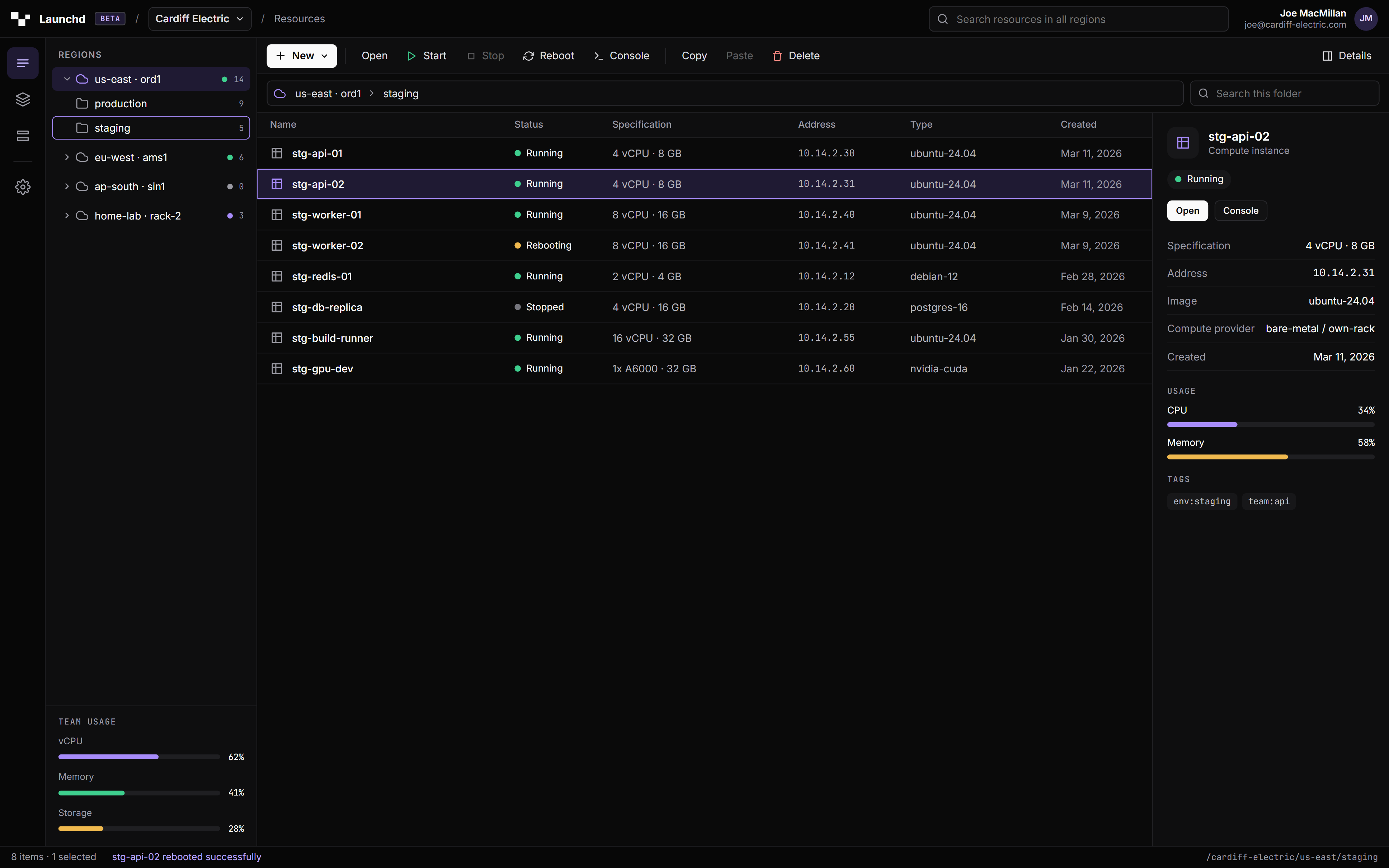
Every provider we’ve used organizes compute as a flat list you filter and search. Launchd organizes it as a tree, because that’s the shape it actually has: regions contain folders, folders contain instances, instances have children of their own — volumes, snapshots, network interfaces.
Select a region in the sidebar and its folders expand inline, the way a file manager works and a web console never does. Drag an instance from staging into production and it moves — no export, no redeploy, no ticket. Right-click anything for the full action set. The breadcrumb above the list always tells you exactly where you are, because at 2 a.m. you will have forgotten.
Launchd doesn’t care whether a machine lives in a datacenter we run or a rack in your office. Point the agent at any SSH-reachable box — bare metal, a home-lab server, a colo cage you’ve had since 2019 — and it shows up in the tree next to your cloud regions. Same console, same audit log, same drag-and-drop.
That GPU box under the stairs stops being a special case you SSH into manually and start forgetting about. It becomes a region with a name, a folder structure, and a console tab, like everything else.
Most clouds bake a key into the image at boot and call it done. Need to add a teammate's key later, or cut off someone who just left? You're SSHing in to hand-edit authorized_keys yourself — assuming you still can.
Launchd syncs keys at the hypervisor, not inside the guest OS. Add a key to your account and it's pushed into every VM that should have it — instantly, no redeploy, no logging in by hand. Revoke one and access is gone at the host boundary. The guest doesn't get a vote, and it never even sees the attempt.
The rest of the console is listed below. These are the parts that are easier to show than to explain.
Create, start, stop, reboot, resize, and reinstall from base images, with cloud-init baked in — the status dot in the tree flips the moment it's actually true, not when a cache catches up.
Point-in-time root-disk snapshots, plus live resize and reinstall, on the same volume whether it's on our storage or the disk in your rack. Restore, or purge after your retention window.
Private VPCs with real security groups, enforced at the network layer — not an API-level suggestion. VXLAN overlay means two instances on the same network reach each other across physical hosts without you configuring that.
Compute, containers, networking, storage, and the access control to tie it together — all in one tree, under one account.
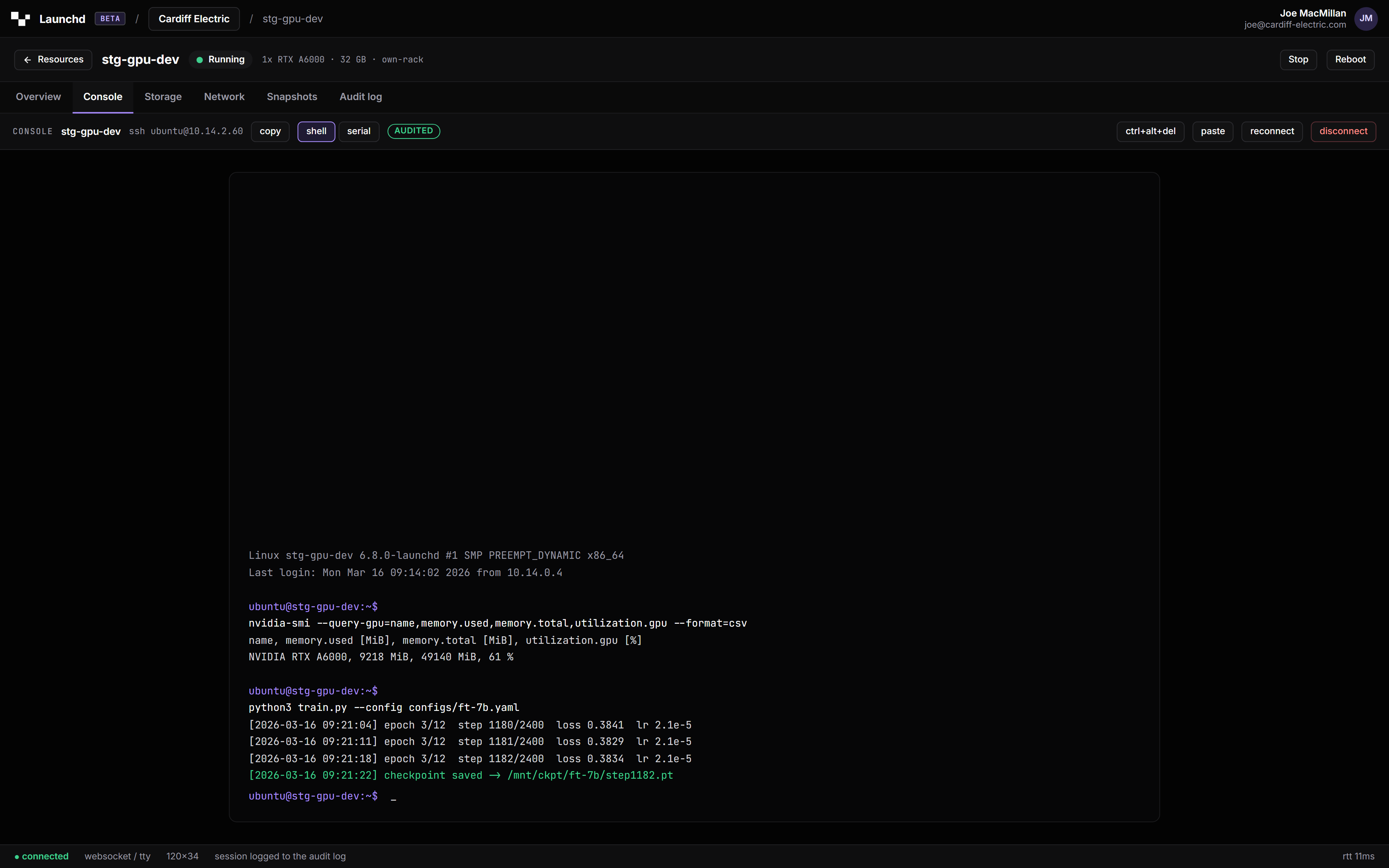
Virtual machines with an in-browser console built in, so opening one doesn't mean finding your SSH client first. VMs, container apps, and static sites all live in the same folders — not three separate dashboards pretending to be one product.
Deploy a container directly, no cluster to provision first. Point a domain at it, give it the secrets and the persistent storage it needs, and expose whatever ports it actually uses.
Private networks with firewalls that are actually enforced, not just checked by an API. Every network gets its own router handling NAT, DNS, and a WireGuard VPN in — and a floating IP whenever you need one public.
Object storage for the things that don't belong on a disk, block volumes for the things that do, and a library of base images to start any of it from.
Teams, folders, and roles that are either admin or member — nothing in between to misconfigure. Invite-only signup, scoped API tokens, and one vault for every SSH key across your fleet.
An audit log of who did what, webhooks and live event streams for anyone building their own dashboard on top, and per-team quotas that keep one project from quietly eating the whole rack.
We're letting teams in a few at a time while we finish building this. Tell us what you're running and where, and we'll reach out when there's room.